


 PitIn Beta
The instruments you can't bring outside.
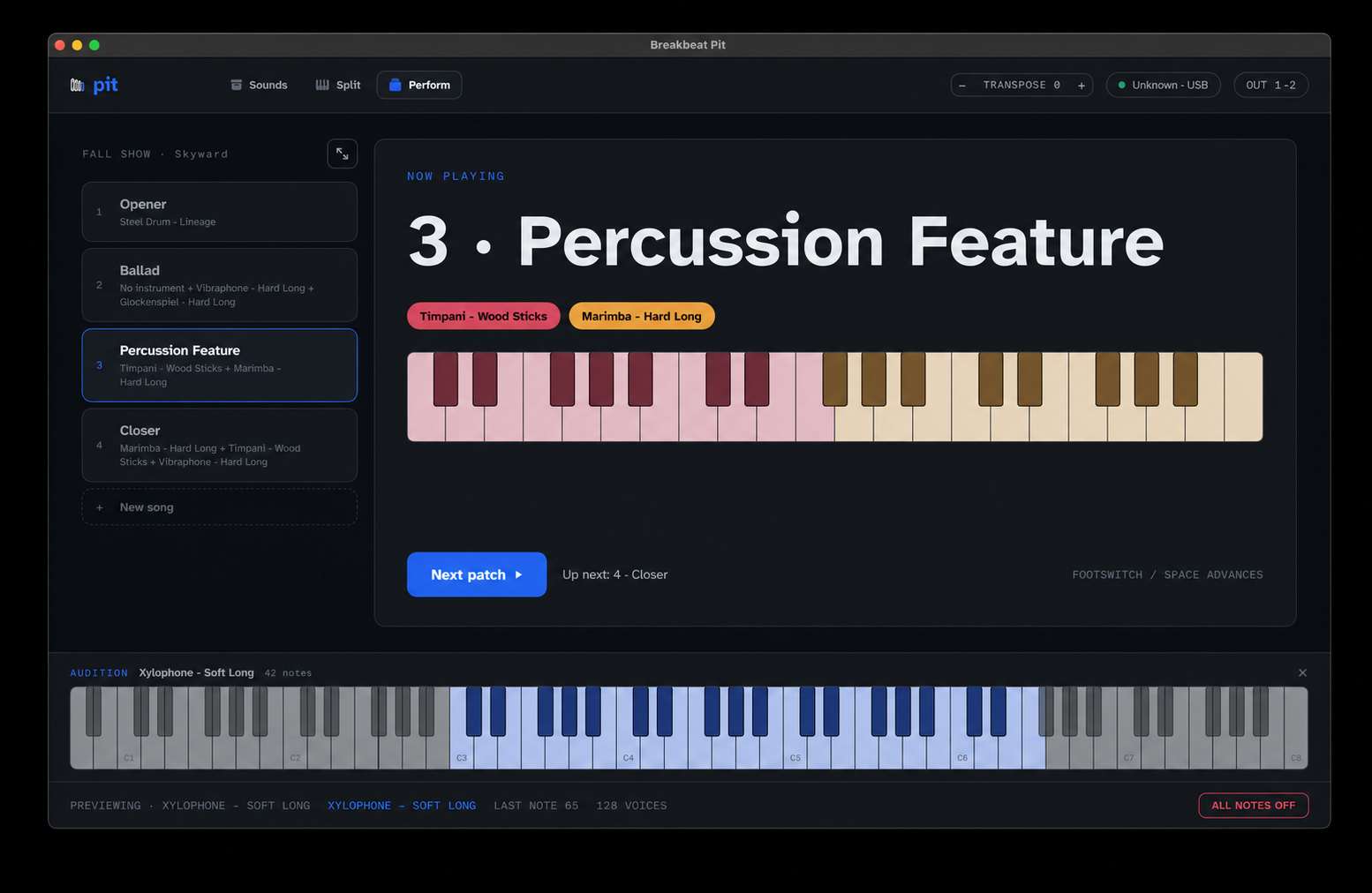
A pitched-percussion sampler and show player for front ensembles, theatre pits, and schools. Marimba, vibes, xylophone, glock, chimes, crotales and a full accessory rack — played from any class-compliant MIDI controller. Three screens: Instruments, Shows, Perform.
What it does
- Instruments → Shows → Perform. Drag zone handles on a keyboard to split your controller. That's the whole workflow.
- Sideline-readable Perform screen: 84pt now-playing type, footswitch advance.
- Pedals: sustain and expression supported — vibraphone pedaling works the way your hands expect.
- Performance-only on purpose: no FX, no sequencing. DCI/WGI compliance is a feature, not a gap.
- Setlists and patches saved as .pitshow bundles — one document per show.
- Works offline. No account, no internet on the field.
- Suite-aware: answers /suite setlist and panic messages when Rundown runs the show.
You bought the controller. Now get the instruments.
The samples exist. The player doesn’t. Studio software belongs in a studio — most front ensembles run MainStage or GarageBand off a laptop: power, an audio interface, a mixer, then speakers, set up and troubleshot by whoever’s available. Things don’t power up. Things don’t connect. The laptop is the hardest thing to get out there.
Pit replaces that laptop stack with one app built for the job. Load sounds, split the keyboard, hit Perform. Run it without a manual.
One player. More colors. Less rig.
A high school band director’s vision of a marimba performance is different from a virtuosic orchestral percussionist’s. Most tools in this space were built for the studio mindset — max velocity layers, max realism, max complexity — exactly what overwhelms a director whose real goal is “sounds good from the stands, doesn’t crash.” Pit is performance-first: the standard is the performance, not the recording.
Directors don’t want problems. They want answers. Pit is the answer.
Built for shows, not sessions
A .pitshow document holds the whole production: songs, splits, patches, in order. Advance with a footswitch. The now-playing readout is readable from the sideline. When the rest of the suite is present, Rundown can drive Pit’s setlist over the LAN — and when it isn’t, Pit is complete on its own.
The sounds ship inside the app
Pit’s instrument library is part of the download — marimba, vibraphone in soft and hard mallets, xylophone, glockenspiel, chimes, hand chimes, crotales, and eighteen front-ensemble accessories from triangle to gong. There is no sample pack to buy, no separate installer to run, and nothing to download on a school network before the app makes a sound.
Those samples come from the Versilian Community Sample Library (CC0, public domain) and the University of Iowa Electronic Music Studios (free for any use). Neither source requires credit; we give it anyway, and the same credits are in the app under Settings → Sounds & Credits. Sparse source recordings were filled out chromatically by repitching the nearest sampled note.
Details
| Platform | macOS (SwiftUI + shared C engine) |
|---|---|
| Controllers | any class-compliant MIDI controller |
| Named examples | malletSTATION EM1/EM PRO, MalletKAT, any MIDI keyboard |
| Pedals | CC64 sustain, CC11 expression |
| Document | .pitshow (show.json + kit manifests) |
| Kit format | .bkbt (kitType: "pitched") |
| Suite OSC port | UDP 5680 |
| Typeface | Atkinson Hyperlegible (bundled) |
| Sound library | 27 kits bundled in the app (VCSL CC0 + U. Iowa) |
Plays well with
Standalone first: Pit never needs another app installed. When siblings are present, they find each other on your LAN and follow the same show.